
Making Music With the Teenage Engineering Field System: How the Pieces Work Together
There is a strange gap in Teenage Engineering's Field system. Each box is beautiful and deep on its own, but nobody quite explains how they add up to a finished piece of music, or where the system runs out of road. If you own a couple of these things and keep hitting a wall when it comes to actually finishing a track, you are not doing it wrong. The system has a particular grain, and once you understand that grain, the workflow makes sense. We make a recorder for iPhone, so we have a bias about one part of this, but most of what follows is simply how the gear behaves. This is the veteran-level map we wish we had when we started combining these boxes.
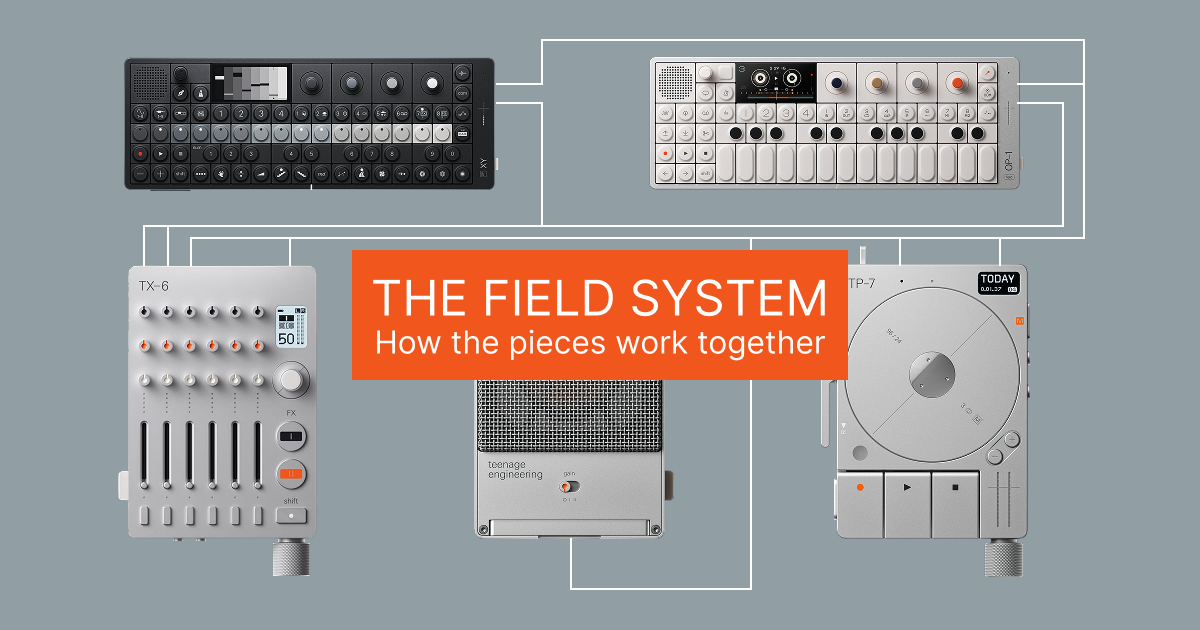
The one thing that explains the whole system
Here is the idea that makes everything else click. The Field system, and the wider OP range around it, is built to commit as you go. You capture a part, make a decision and move on, rather than keeping every option open on a timeline forever. That is the grain of the whole system, and it is the same discipline that made four-track cassette records.
Worth knowing what these boxes can actually carry, because the channel counts are healthier than the size of them suggests. The TX-6 is a twelve-channel interface, and it will take ten channels back the other way, which matters below. The OP-1 Field is an all-in-one instrument rather than an interface, but since firmware 1.6 it streams class-compliant USB audio, up to ten channels, so its individual tape tracks can land in a DAW or a USB mixer as separate parts. The TP-7 records three stereo inputs at once and streams multichannel over USB, and paired with a TX-6 you can capture six stereo tracks. A recorder like Reel gives you four tracks that are each stereo or mono as you choose, so up to eight channels across four stereo pairs, or four mono parts, or any mix of the two. If you want stems, you can get stems.
It is worth being precise about what you can and cannot do here, because the system is more capable than its reputation suggests. Sequencing is well served: the OP-XY loops patterns, live records, overdubs while the song runs and chains patterns into scenes. Recorded audio is editable too. The OP-1 Field's tape lets you lift and drop takes, split and join them, lift a region using the loop points, shift-lift all four tracks to move a whole arrangement, and since firmware 1.7 it has tape undo. The honest exceptions are narrow: the OP-Z and OP-XY leave as a stereo mix rather than stems. Expecting a laptop is where the frustration starts, but that is about working method rather than missing capability.
What each box is really for
Before you can build a chain you need an honest sense of what each piece is good at and where it stops. The marketing tells you what they do. Here is what they are for.
The OP-1 Field is the sketchpad. It carries synth engines many players still consider the nicest in the range, a deep and strange set of effects including the infamous CWO, a delay built around an overtone frequency shifter that pulls a sound apart from the inside, a built-in mic good enough to sample with, and a sampler of its own. Its character comes from its limits: a four-track tape, eight tapes in memory, and a workflow that asks you to commit and print rather than tweak forever. That is the whole appeal, and it is also the thing people bounce off.
The OP-XY is the groovebox, and it was built to answer the OP-1 Field's weak points. It is the flagship that grew out of the OP-Z, with sixteen tracks, a real song mode, parameter locks and far deeper MIDI editing. It has synth engines and samplers of its own, though plenty of people still prefer the way the OP-1 Field's engines sound. The OP-XY suits players who work by sequencing and programming rather than performing live, and who want to go back and tweak later instead of committing to tape.
The TP-7 is the recorder and the archive. It captures 24-bit at 96kHz across three stereo inputs, its motorized wheel scrubs and scratches like tape, and it will record for as long as you have storage. Be aware of one thing owners learn late: scratching on the wheel is a playback gesture, and the TP-7 cannot record its own scratch performance in a single pass on its own. Since firmware 1.1.10 you can print reel and rocker moves, but only in mixdown mode through a TX-6, or by re-capturing over USB in a second pass. It also does something quietly useful: it can take the OP-1 Field's four tape tracks as separate stems, so you can mix them properly later, and it gives you somewhere to offload work when you run out of the OP-1 Field's eight tapes. It has a decent built-in mic too. What it does not have is live looping or a song mode.
The TX-6 is the centre console. Six stereo channels of studio mixer in something smaller than your hand, with per-channel EQ, compression, studio-grade effects and a surprising amount of customisation under the hood. It sends MIDI clock and can even read tempo from an incoming signal, so it can keep the whole rig in time, and it is where everything plugs in to talk to everything else. Be realistic about the knobs, though. They are too fiddly for expressive live mixing, so set your levels and leave them. It is also an underrated live mixer for cramped stages where a full-size desk will not fit.
The CM-15 is the optional upgrade. A mono studio condenser with its own preamp and USB-C connection, battery powered, so it records into a phone or tablet over a single cable. It is clearer and more detailed than the built-in mics on the TP-7, OP-1 Field or OP-XY, and it is what you reach for when the quality of the recording is the point rather than just catching an idea.
The OP-Z is worth a mention as the OP-XY's little brother. It is not part of the Field line, but it is the same sixteen-track sequencing idea at a fraction of the price, and it will happily run a rig if the OP-XY is out of reach.
The OP-1 Field and OP-XY are two halves of the same idea
This is the pairing worth understanding, because the two boxes are opposites in the most useful way. The OP-1 Field is destructive and intentional. You print to tape, you commit, you move on, and the limits push you toward sound design and actually finishing things. The OP-XY is non-destructive and precise. You sequence, you parameter-lock, you go back and edit, and nothing is final until you decide it is.
Run them together and you get both halves of how music tends to get made: tape-based sampling and happy accidents on one side, tight programming and arrangement on the other. That is why people who own both rarely talk about one replacing the other, and why the two of them fit in a bag. It is worth saying plainly, though, that you do not need both. Either is a complete instrument on its own, and both have mics good enough to sample a room with.
Do you actually need the CM-15?
Honestly, no. Not if you already own a TP-7, an OP-1 Field or an OP-XY. All of them record, and all of their built-in mics are good enough to capture ideas and sample with. Anyone telling you the CM-15 is essential to a Field setup is selling something.
So why does it exist? Because it is better, and because it is useful well outside this system. It is noticeably clearer and more detailed than any of those built-in mics, it has its own preamp, it runs on battery, and there is very little else in that form factor that sounds like it. People benchmark it against a Neumann U87, which tells you how seriously it is taken, and there are plenty of shootouts online if you want to hear it for yourself. To our ear it is the clearer, more solid-state of the two, where a U87 brings more warmth and midrange character, but it is far closer than a mic this size has any right to be. It is what you reach for if you record a lot of vocals, or want your playing captured at studio quality rather than merely captured.
It also unlocks a genuinely good portable rig. A CM-15 into a TP-7 is a two-piece, battery-powered setup for high-quality voice or instrument recording with no time limit, which makes it a serious little podcast and field-interview kit as much as a musical one. You could do the same job by pointing an OP-1 Field at the room, but you would not enjoy it, and that is the honest case for the CM-15.
You do not need the TP-7 to get there, either. The CM-15 is class-compliant over USB-C, so it plugs straight into an iPhone with no interface in between. Our own app, Reel, takes it natively as a four-track recorder, and there are other multitrack apps that will do the job too. That is a perfectly good way to run the mic while you decide whether the TP-7 is worth it, and plenty of people never move past it.
What to buy first, if you want it all eventually
The whole system costs serious money, so the order you buy in matters more than most people admit. Buy it in the wrong order and you end up with an expensive mixer and nothing interesting to plug into it.
Start with one all-in-one instrument, either an OP-1 Field or an OP-XY. Whichever you pick covers an enormous amount of ground on its own: you can write, record, mix and save entire pieces without owning anything else in the range. Which one comes down to the split we covered earlier, tape and commitment against sequencing and editing. Get that decision right and the rest of the system becomes optional for a long while.
That first box also stretches further than people realise once you plug it into a phone. An OP-1 Field set to its 8-channel USB mode can record as separate stems into a multitrack app like Reel on an iPhone, and an OP-XY can send its stereo master the same way. So you can be capturing proper multitrack takes, mixing them and keeping an archive long before you save up for a TP-7 or a TX-6. A laptop DAW does the same job if you have one.
After that, stop and ask what you actually want to improve, because the answer decides what comes next rather than any fixed order.
- You have other hardware you want to bring in, or you play live on cramped stages: the TX-6 is your next buy. It is the centre console that lets everything talk, sends clock and mixes it all down to one output.
- You want to stay a one-machine musician but keep running out of room: the TP-7 is the one. It archives your samples, holds recordings with no time limit, captures live takes of your compositions, and stores the OP-1 Field's tape tracks as stems so you can escape its eight-project ceiling.
- You are a singer-songwriter and want your voice or your instrument captured properly rather than just captured: the CM-15 is the upgrade, and it will outclass every built-in mic in the range.
The limits are narrower than they look
Put the pieces together and they cover more ground than people give them credit for. The OP-XY handles sequencing, non-destructive editing and arrangement. The OP-1 Field's tape handles sound design and audio arrangement, and it is a genuine editing surface rather than a one-way street: lift and drop takes, split and join them, lift a whole region with the loop points, move all four tracks at once, and undo if you regret it. The TP-7 handles capture and archiving, the TX-6 handles mixing and clock. Between them there is very little you cannot do.
The real limits are narrower than the complaints suggest. Editing is not as surgical as a DAW, where you can zoom to the sample and nudge something forever. Parameter locking is not as deep as an Elektron. If your work depends on that kind of precision you will feel it. For most music it is a small price, and there is genuine charm in not getting too technical at the recording stage. Plenty of records people love are carried by vibe and feel rather than pristine mixing, and gear that gently discourages you from fiddling is doing you a favour more often than not.
Workflow 1: the home hub
At home the TX-6 is your centre of gravity, and the goal is to have everything flow through it while a couple of devices handle sequencing and capture. A typical chain looks like this. Your sound sources, an OP-1 Field or an OP-XY making sounds, a groovebox, a synth, run into the TX-6's channels. An aux send feeds a sampler such as an Octatrack so you can grab and mangle anything on the fly, and another send can hit an effects box like a granular synth. One device holds the clock, often the TX-6's own beat tracking, so the whole rig stays in time.
The TP-7 sits alongside as your capture and mixdown surface. You sketch ideas into it as you jam so nothing is lost, loop a riff to play over, and when a take is right you bounce your layers down. The OP-1 Field's individual tape tracks can be pulled across as separate stems as you go. It is a hub-and-capture setup, and it is exactly why the TX-6 and TP-7 are such a natural pair.
What the TX-6 actually unlocks on the TP-7
If you are wondering why people pair these two rather than just buying the recorder, here is the concrete answer, and it is a bigger gap than the marketing makes obvious. Plug a TP-7 into a plain computer and you get three stereo tracks. Pair it with a TX-6 over USB and you get six. The twelve-channel path is a TX-6 feature, not a TP-7 feature.
There is a rate trade underneath that. Six stereo tracks means running at 48kHz, and the TX-6 is a 48kHz interface anyway. Choose 96kHz on the TP-7 and you drop to three stereo tracks. So the choice is depth of track count against sample rate, and for most music the six tracks are worth more than the extra headroom.
The pairing also gives you the mixdown loop, which is the nicest thing either box does. Play a multitrack recording back from the TP-7 through the TX-6, ride the faders and effects live, and the result records straight back to the TP-7 as a new stereo file while the original multitrack stays intact. It is a proper record, mix and bounce cycle over one cable, with no computer anywhere. Worth knowing it only arrived in TP-7 firmware 1.1.9 in mid-2025, and the firmware after it added the ability to print reel and rocker gestures into that mixdown, which is the only way to capture your scratching on this system.
The motor noise nobody mentions
One thing to know before you record anything quiet on a TP-7 with its own microphone. The motor that drives the wheel is audible, and it can end up in the recording as a faint friction sound or a periodic click. This is not a rare defective unit: owners have returned multiple units and found the same thing, and Teenage Engineering's own support has explained it as the bearing mechanism that lets the wheel turn.
The fix is built in, and it is why the setting exists. The wheel motor has three modes: on for both play and record, on for playback only, or off entirely. Turn it off when you are recording something quiet with the internal mic and the noise goes with it, at the cost of the wheel no longer spinning or scrubbing. Most people never find this setting and assume their unit is faulty.
Workflow 2: the cabin session
Away from home the priorities flip. Now it is battery life, few cables and capturing real sound. This is where the CM-15 earns its place, recording a guitar, a banjo, a voice or the room over a single USB-C cable into a phone or tablet. The TP-7 becomes your main sketchpad, catching ideas the moment they arrive, and the TX-6 comes along if you want a proper mixer for a few sources.
The question that always comes up on a trip like this is how to actually finish something rather than just collect sketches. Live looping on the TP-7 is limited, and its bounce workflow is deliberate rather than instant. So you have a choice to make about where the song gets built, which is the next section. The short version for the field is to sketch freely into the TP-7, decide on a structure, then commit, either by overdubbing on the TP-7 like a tape four-track or by moving the parts to whichever arranger you brought.
How to actually finish a track with Field gear
There are really four honest routes to a finished piece with this gear, and the right one depends on what you own and how you like to work.
The OP-1 Field tape is the built-in answer. Four stereo tracks, six minutes a tape and eight tapes in memory, four tape styles for the character you want, and a full stereo 32-bit path on the Field version. You arrange across the tape, bounce when you run out of room, and print a stereo master. If you have the Field, this is the most self-contained way to finish inside the system.
The TP-7 as a manual four-track is the old-fashioned route, and it genuinely works. Record a part, overdub the next in dub mode, bounce your layers down to free up room, then keep building. Cue points help you navigate, and you can set them live while recording or afterwards. One detail worth knowing, because almost nobody states it: the TP-7's bounce is not destructive. Teenage Engineering's guide says plainly that a new file is created and the old file is kept as well, so unlike a real cassette four-track you are not burning your only copy each time you commit. Edit mode elsewhere is destructive, so the distinction matters.
The OP-XY as an arranger is the route if you want a real song mode. Lay out the arrangement across its sixteen tracks and nine songs, then bounce the stereo mix out, since it gives you no stems. It is powerful for building structure, as long as you accept that you are committing to stereo to move it anywhere.
An external multitrack is the fourth route, and it is about preference rather than rescue. If you want a bigger screen, surgical editing or a familiar mixing environment, you take your rig into a laptop DAW or a recorder on your phone. Worth remembering that this route runs in both directions now. Reel sends its four stereo tracks plus a stereo master back out over one USB cable, and a TX-6 takes all ten across five of its six stereo strips, so you can record on the phone and then mix it on hardware faders. It is the same record, mix and bounce cycle the TP-7 and TX-6 do together, without a TP-7 in it. And you are not stuck with a stereo bounce coming the other way either: a TX-6 gives you twelve channels, and an OP-1 Field will stream up to ten over USB, so you can carry separate parts across if you want them. On the original OP-1 in particular, moving the finish off its mono, lo-fi tape and onto something cleaner is often worth it. This is the one place we will name our own app, because it is the job it does. Reel is a four-track recorder for iPhone that takes a class-compliant USB input, from a TX-6 or a mic like the CM-15, and records in clean 32-bit float with looping and overdub, so it adds the arranging surface the Field system leaves out without dragging a computer to the cabin. Each of its four tracks can be stereo or mono, so that is up to eight channels if you want four stereo pairs, or four mono parts, or any combination. Use whichever of these four fits how you actually work.
A note on the original OP-1 versus the Field
This one trips people up, so it is worth being clear. If you are finishing on an original OP-1 and feeling like you lose quality, you are not imagining it. The original's tape is largely mono and lower resolution, which is part of its lo-fi charm but a real limit if you want a clean, wide master. The OP-1 Field fixed exactly this, with a full stereo, 32-bit signal path and far more storage. So if fidelity matters for your finish, that gap is the reason, and it changes the maths on whether to build the final version on the OP-1 tape or move it to something cleaner.
Keeping it all in time
None of these workflows hold together without sync, and it is simpler than it looks. Pick one device to be the clock and let it drive the rest. The OP-XY or OP-Z can sequence and clock a whole rig, and the TX-6's beat tracking can generate clock from an incoming signal, which is handy when your source does not send one. Clock travels as MIDI, over USB or a 3.5mm TRS cable, so a plain USB hub is fine for fanning it out to several devices.
Two honest clarifications. Pocket Operators sync through their own analog click on an audio channel rather than MIDI, so they need a bridge to join a MIDI setup. Ableton Link, which people often ask about, is also not a hardware feature on these boxes. Link lives on the app and computer side, in things like AUM and, in beta, our own recorder, syncing software over wifi. Your hardware still syncs by MIDI clock or analog sync. When timing drifts it is almost always two devices both trying to be the master, so decide on one and the problem usually disappears.
Where this leaves you
The Field system is not a shrunken laptop, and it stops being frustrating the moment you stop treating it like one. It is a commit-as-you-go way of working, and between the pieces it covers far more ground than its reputation suggests. The channels are there if you need them, twelve on the TX-6 and up to ten streaming out of an OP-1 Field. The tape edits, the sequencer arranges, the recorder archives. What you give up against a laptop is surgical precision, and what you get back is gear that keeps you playing instead of fiddling. Lean into that and finish on the OP-1 tape or by bouncing on the TP-7, or bring in a DAW or a phone if you want a bigger screen to work on. Either way the trick is the same. Decide, print and keep moving. That is what these boxes are built to reward.
If you want the plumbing side of getting all this into a phone or tablet, there is a separate guide on connecting multiple devices to an iPhone or iPad, and one weighing the TX-6 against the cheaper K.O. Sidekick.
Frequently Asked Questions
Can the Teenage Engineering Field system build a full song?
Yes, mainly three ways: arranging on the OP-1 Field's four-track tape, building up on the TP-7 by overdubbing and bouncing, or laying out an arrangement in the OP-XY's song mode. The catch is not channel count, since a TX-6 carries twelve channels and an OP-1 Field will stream up to ten over USB, so parts can go into a DAW separately. It is that recorded audio has no clip-based timeline to rearrange on and no live audio looper, so takes get committed as you go. Sequenced parts are different: the OP-XY loops patterns, overdubs live and chains scenes, so that side stays editable.
Does the TP-7 have live looping or a song mode?
No. The TP-7 does sound-on-sound overdubbing, one loop per recording, cue points and a bounce that merges layers into a stereo file, but it has no live-looping mode and no song or arrangement sequencer. It is a recorder and mixdown surface, not an arranger.
How many tracks can a TP-7 record?
Three stereo tracks into a plain computer, or six stereo tracks when paired with a TX-6 over USB, since the twelve-channel path is a TX-6 feature. There is a rate trade too: six stereo tracks requires 48kHz, and choosing 96kHz drops you to three stereo tracks.
Can you record scratching on the TP-7?
Not on its own in a single pass. The wheel's scrubbing and scratching is a playback gesture, so it does not print into a recording made on the TP-7 alone. Since firmware 1.1.10 you can capture reel and rocker moves in mixdown mode through a TX-6, or you can re-record the TP-7's output over USB in a second pass.
Why does my TP-7 recording have a clicking noise?
Most likely the wheel motor being picked up by the internal microphone. It is a known characteristic rather than a faulty unit, and Teenage Engineering has explained it as the bearing mechanism that turns the wheel. The wheel motor has three modes, on for play and record, on for playback only, or off, so switching it off while recording something quiet removes the noise.
How do the TX-6 and TP-7 work together?
The TX-6 mixes and the TP-7 records. The TP-7's tracks can route into the TX-6 for live mixing with per-track EQ and effects, then bounce back to the TP-7 as a stereo master. The TX-6 also has beat tracking, so it can read a tempo and send clock to keep the whole rig in time.
OP-1 Field or OP-XY, and where does the OP-Z fit?
They are opposites, and that is the point. The OP-1 Field is destructive and intentional, printing to a four-track tape so you commit and move on, with synth engines many players prefer. The OP-XY is non-destructive and precise, with sixteen tracks, a real song mode, parameter locks and deeper MIDI editing for people who sequence rather than perform. Either is complete on its own, and together they cover both halves of how music gets made. The OP-Z is not part of the Field line, but it is the OP-XY's little brother and a far cheaper way into the same sequencing idea. Both the OP-XY and OP-Z leave as a stereo mix, so plan to commit their output rather than expecting separate stems.
Is the OP-1 Field better than the original OP-1 for finishing tracks?
For fidelity, yes. The OP-1 Field records a full stereo, 32-bit signal path, where the original OP-1's tape is largely mono and lower resolution. The original's tape is charming and lo-fi, but if you want a clean, wide master, the Field is the clear upgrade or you move the finish to something cleaner.
What order should I buy the Teenage Engineering Field system in?
Start with one all-in-one instrument, an OP-1 Field or an OP-XY, since either lets you write, record, mix and save on its own. What comes next depends on what you want to improve: a TX-6 if you have other hardware to bring in or play live, a TP-7 if you need more storage, longer recordings and an archive of stems, or a CM-15 if you record vocals or acoustic instruments and want studio quality. In the meantime a laptop DAW, or a multitrack app on an iPhone, covers the mixing and recording jobs until you buy the hardware.
How do I finish a track if I only have a TP-7?
Treat it like a cassette four-track. Record a part, overdub the next with sound on sound, bounce your layers into a single stereo file to free up room, and keep building. If you want real looping or to keep parts separate, take the TP-7's output into a laptop DAW or an iPhone recorder instead.
Related guides
- Connecting Multiple Devices to an iPhone or iPad: Hubs, Mixers, Sync and the One-Interface Rule →
- TX-6 vs K.O. Sidekick: Which Teenage Engineering Mixer for iPhone and iPad? →
- The Teenage Engineering CM-15 and iPhone: A Studio in One Cable →
- Recording with OP-1 Field and iPhone →
- Reel vs OP-1 Field →
- How to Mix Your iPhone Multitrack on a TX-6 →
- TP-7 File Transfer to iPhone: MTP Without a Computer →
More from the blog
TP-7 File Transfer to iPhone: MTP Without a Computer
Getting recordings off a Teenage Engineering TP-7 has always meant a computer. It does not any more. TP-7 MTP file transfer straight to an iPhone, multitrack takes staying multitrack, six-track takes included, and takes going back to the device. Coming soon to Reel.
MTP on iOS: We Got the OP-1 Field, OP-XY and TP-7 Talking to an iPhone
MTP on iOS was supposed to be impossible. It is not. Move recordings between an iPhone and an OP-1 Field, an OP-XY or a TP-7 with no computer in the middle. Tapes come across as separate tracks, single tracks lift into other songs and everything can be sent back to the device. Coming to Reel.
Author
Tug
Founder of 24bit Studio and the developer of Reel, a portable 4-track recorder for iPhone.