
TP-7 File Transfer to iPhone: MTP Without a Computer
Getting recordings off a TP-7 has always meant finding a computer. In MTP mode it does not talk to iPhones the way other devices do, so every transfer until now has gone through a laptop sitting in the middle. The accepted wisdom was that it could not be done on iOS at all. No app has managed it. We found a way in.
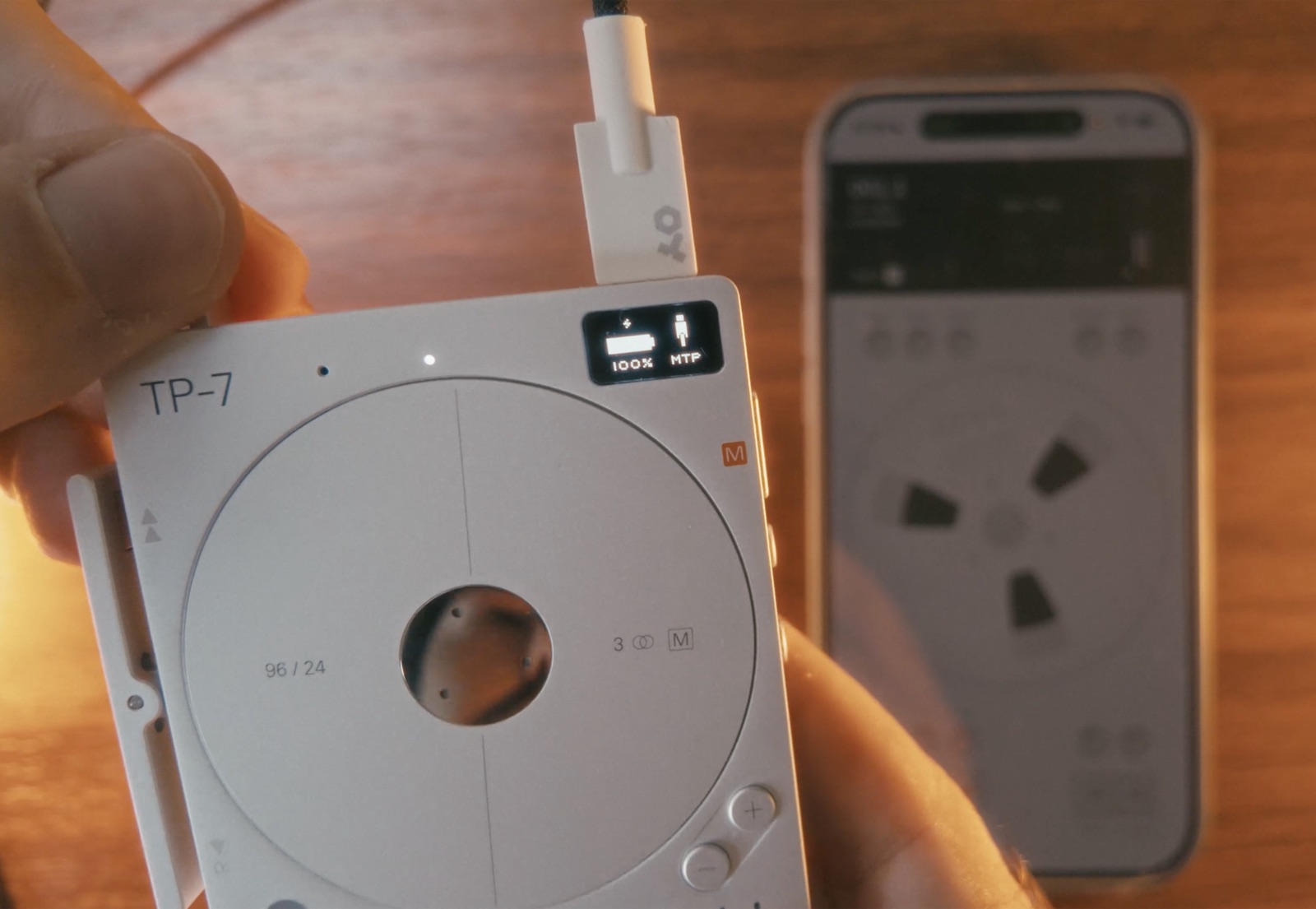
The short answer
A TP-7 can transfer files straight to an iPhone over MTP with no computer anywhere. Plug it in, open Reel, browse the recordings on the reel display and copy across what you want. Multitrack takes arrive as multitrack reels with every track in its place, six-track takes included. Takes can go back to the device afterwards as native TP-7 takes.
As far as we know this is a first on iPhone. It is coming to Reel soon. Not in the App Store version yet.
Why this has always needed a laptop
The TP-7 records beautifully. Three stereo jacks, six inputs, 96kHz at 24-bit, a machined body you actually want to pick up. Then you finish a session and the recordings are stuck on it.
MTP is the mode that lets a host see what is on the device. On a Mac that works. On an iPhone the TP-7 does not behave the way other devices do in that mode, which is why every guide, every forum thread and every support answer ends the same way. Go and find a computer.
If you have been trying to make it work, nothing you have set up is wrong. It genuinely has not been possible.
What it looks like now
One cable from the TP-7 to the phone. Reel sees the device arrive, then lists what is on it. Pick a recording and it comes across, with no computer, no export dance and nothing to shuffle around. The file just moves.
Tape swaps
We call it tape swaps, because that is what it feels like. Reel and the TP-7 become two tape machines that can finally hand each other tapes.
- Pull any TP-7 recording straight into Reel
- Multitrack takes land as multitrack reels, every track in its place, ready to play and overdub. Six-track takes included
- Work on it in Reel, then send it back to the TP-7 as a native take
- Back up every recording on the device to your phone
- Build a multitrack in Reel and send it to your TP-7 for further work
Multitrack takes stay multitrack
This is the part that matters most if you use the TP-7 as a recorder rather than a scratchpad. A multitrack take does not arrive as a stereo bounce. It arrives with its tracks intact, each one where it belongs, ready to play back or overdub against.
So a six-track take you captured on three stereo jacks turns up in Reel as the take you actually recorded. Rebalance it, scrub it, add the part you could not fit on the day, then send it back to the TP-7 when you want it on the device again.
Backing up the whole device
The other half of it is quieter. Every recording on the TP-7 can be copied to your phone, which means the sessions living on one device stop living on one device.
Nothing gets removed to make room, either. Reel will not clear anything off your TP-7 to fit something else, which is a rule the whole thing is built around rather than a setting you have to find.
Why this exists
Honestly, because you kept asking. Since the day Reel launched, the most requested thing from TP-7 owners has been the same sentence. Get my recordings off this device without a computer.
Every email, every feature request, every "any chance Reel could read my TP-7?" pushed it up the list until it was the only thing we were working on. Thank you for that. Keep them coming.
It is still in testing on our own devices. It works. Coming soon.
Frequently Asked Questions
Can you transfer files from a TP-7 to an iPhone?
Yes. A TP-7 in MTP mode connects to an iPhone with a single USB-C cable, and Reel lists its recordings on screen so you can copy them across with no computer involved. Multitrack takes come in as multitrack reels, six-track takes included. It is coming soon and is not in the App Store version yet.
Does the TP-7 work with MTP on iOS?
It does now. In MTP mode the TP-7 does not talk to iPhones the way other devices do, which is why every transfer until now has needed a laptop in the middle. It was widely held to be impossible on iOS. As far as we know Reel is the first app to manage it.
How do you get recordings off a TP-7 without a computer?
Put the TP-7 into MTP mode, connect it to an iPhone with one USB-C cable, then browse and copy the recordings in Reel. There is no export step and no file shuffling. This is coming soon rather than available today.
Do TP-7 multitrack takes stay multitrack?
Yes. A multitrack take arrives as a multitrack reel with every track in its place rather than being folded down to a stereo bounce, so you can play it back, rebalance it or overdub against it. Six-track takes are included.
Can you put recordings back onto a TP-7?
Yes. Work on something in Reel, then send it back to the TP-7 as a native take. You can also build a multitrack in Reel and push it to the device for further work, so recordings move in both directions rather than only off the device.
Will Reel delete anything on my TP-7?
No. Reel will never remove anything from your device to make space for something else. That is a rule the whole thing is built around rather than an option you have to find.
Which app can read a TP-7 on an iPhone?
Reel, once this ships. No app has been able to browse or transfer TP-7 recordings on iOS until now, which is why the answer everywhere has been to use a computer. It is in testing on our own devices and is coming soon.
Related guides
More from the blog
MTP on iOS: We Got the OP-1 Field, OP-XY and TP-7 Talking to an iPhone
MTP on iOS was supposed to be impossible. It is not. Move recordings between an iPhone and an OP-1 Field, an OP-XY or a TP-7 with no computer in the middle. Tapes come across as separate tracks, single tracks lift into other songs and everything can be sent back to the device. Coming to Reel.
How to Record Your OP-XY (and Why You Cannot Get Stems Over USB)
The OP-XY sends a stereo master, not stems. Why that myth exists, the exact levels and settings that matter, and the multi-out trick that gets you two submixes at once.
Author
Tug
Founder of 24bit Studio and the developer of Reel, a portable 4-track recorder for iPhone.